 An official website of the United States government

The Hematopoietic Database
This section goes through the Hematopoietic Database and explains the different fields and what they are used for. It is very important that you familiarize yourself with the database. When coding Hematopoietic neoplasms, the database is always the FIRST step. For some cases, such as a single histology, the database may be the ONLY step needed.
When coding Hematopoietic neoplasms, use the database to determine what your primary site(s) and histology(ies) are. Having this information on hand PRIOR to going through the multiple primary rules in the Hematopoietic manual will be very helpful.
Main Heme DB Home Page
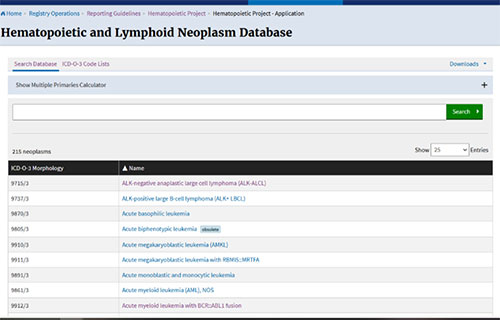
This is the main/home page of the Hematopoietic Database. When first opening the database, it defaults to the histologies in alphabetical order.
Link to the database: SEER Hematopoietic and Lymphoid Neoplasm Database
Downloads: In the top right hand corner, you will see “Downloads.” When you click on that, you can get a copy of the Hematopoietic Manual, or the users guideline.
ICD-O-3 Code Lists: Found in the upper left hand corner, next to “search database,” clicking on this will take you to another webpage that will have a numerical listing of the Hematopoietic database, including the morphology code, the name and the reportability. By clicking on the white line below the “displaying code lists for,” you can generate lists of morphology terms by ICD-O-3.2, ICD-10, or ICD-10-CM.
This section will guide you through fields in the Hematopoietic Database and explain how they are used.
Search box: This is the long white bar with a green “Search” button at the end. Enter the terms you want to search for in this box.
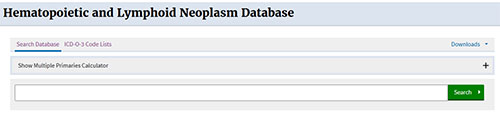
IMPORTANT NOTE: Always make sure “Show Alternative Names” is CHECKED as the diagnosis on a pathology report may be listed as an “alternative” name to the official WHO name displayed in the “NAME” column.
- Do not use words like lymphoma, or leukemia, or acute, as they will return too many terms.
- When searching for a histology, try to find a word that is unique to that term.
- If you use a unique term, such as genetics, and nothing is found, try searching on another word
- Example 1: Diffuse large B-cell lymphoma with MYC and BCL6 rearrangement. Enter “MYC” in the search box
- Example 2: Acute myeloid leukemia without maturation. Enter “maturation” in the search box
- Example 3: Lymphoplasmacytic lymphoma. Enter “lymphoplasmacytic” in the search box
Show Multiple Primaries Calculator: This is related to determining the number of primaries. Never use the multiple primaries calculator first to determine if there are multiple primaries. You must follow the Hematopoietic Manual rules first. Only use the calculator when the rules specifically direct you to do so.
- Review the Multiple Primaries Calculator section in the Heme Manual
Updated: December 2, 2025